2026 Municipal Election · Whitchurch-Stouffville
How to Vote
This year there are more ways to vote than ever before. Whether you vote online from home or in person at a location near you, here is everything you need to cast your ballot with confidence.
Start here
New this year
Two changes make voting easier in 2026, and they mean a few things work differently than in past elections.
Vote Anywhere
There are no assigned polling places this year. You can cast your in person ballot at any voting location in town, no matter which ward you live in. Just pick whichever location is most convenient for you.
Where to VoteVote Online
For the first time, you can vote by internet from any device. Online voting is open from October 17 at 10:00 AM to October 26 at 8:00 PM. Your instructions arrive in the mail on your Voter Information Letter.
How to Vote OnlineFirst, make sure you are ready
Who can vote & how to register
You can vote if you are
- A Canadian citizen
- At least 18 years old
- A resident, owner, or tenant in Whitchurch-Stouffville, or the spouse of one
- You may vote only once, no matter how many properties you own or rent
Get on the Voters' List
- Elections maintains the Voters' List, and you must be on it to vote
- Confirm, update, or add your information through the Town's voter portal
- Registered voters are mailed a Voter Information Letter in late September
Acceptable ID
- Bring one piece of ID showing your name and home address
- A driver's licence, utility bill, bank statement, or property tax bill all work
- A passport is not accepted, because the address is handwritten
Your options
How to vote
There are three ways to cast your ballot. Choose whichever is easiest for you, you only vote once.
Option 1
Voting Online
Internet voting is open from Monday, October 17 at 10:00 AM to Monday, October 26 at 8:00 PM. You can vote from a computer, tablet, or phone, anytime during that window.
What you need
- Your Voter Information Letter, mailed to registered voters in late September
- It carries your unique PIN and your online voting instructions
- You log in with your PIN and your date of birth
How it works
- Open the link or scan the QR code on your letter
- Enter your PIN and date of birth, then log in
- Make your choices and submit your ballot
- A confirmation screen verifies your ballot was cast
Need a hand?
- New to online voting? Walk through it with the guide or video below
- No letter by mid October? Email elections@townofws.ca to confirm you are on the list
- Questions? Call 905-640-1900
Step-by-step help for online voting:
Online voting closes at 8:00 PM on Election Day, the same moment in person polls close. There are safeguards so each person can vote only once, so choose one method and vote early.
Option 2
Voting in Person: Advance Voting
Prefer to vote in person before Election Day? Advance voting runs October 17 to 24, 10:00 AM to 5:00 PM. Remember, Vote Anywhere applies, so use whichever location is easiest for you.
Municipal Office
- 111 Sandiford Dr
- Open every advance day:
- Oct 17, 19, 20, 21, 22, 23 & 24
Ballantrae Community Centre & 55+ Club
- 5592 Aurora Rd and 6240 Main St
- Saturday, Oct 17
- Wednesday, Oct 21
- Saturday, Oct 24
Good to know
- There is no advance voting on Sunday, Oct 18
Bring one piece of acceptable ID showing your name and current address.
Option 3
Election Day: Monday, October 26
Polls are open 10:00 AM to 8:00 PM. Thanks to Vote Anywhere, you can vote at any of these nine locations, regardless of which ward you live in.
- 55+ Club, 6240 Main St
- Municipal Office, 111 Sandiford Dr
- Ballantrae Community Centre, 5592 Aurora Rd
- Whitchurch-Stouffville Museum, 14732 Woodbine Ave
- Stouffville Clippers Sports Complex, 120 Weldon Rd
- Stouffville Arena, 12483 Ninth Line
- Leisure Centre, 2 Park Dr
- Eastridge Church, 12485 Tenth Line
- Barbara Reid Public School, 130 Hoover Park Dr
Bring one piece of acceptable ID showing your name and current address. Need a lift to the polls? We can help.
Cannot attend on Voting Day? Vote by proxy
If you cannot attend in person on Voting Day, you may appoint another eligible voter to vote on your behalf through a proxy arrangement. The voter requiring the proxy must complete Form 3, including a wet signature, and have the proxy voter bring it to the municipal office for the election team to sign. The proxy voter may then present the signed form at the voting location and cast a ballot on behalf of that voter. If you wish to have a proxy form signed, please contact elections@townofws.ca to book your appointment.
More ways to vote & get help
Accessibility, proxy voting & contact
Accessible voting
- Accessible voting locations and equipment
- Internet voting from home
- Roving voting for long-term care and retirement homes
- Accessible formats available on request
Vote by proxy
- Cannot attend on Voting Day? You can appoint another eligible voter to vote for you
- See the full proxy process under Election Day above
Questions?
- Town of Whitchurch-Stouffville elections office
- 905-640-1900 or toll-free 1-855-642-8696
- elections@townofws.ca
Dates and details are provided by the Town of Whitchurch-Stouffville and may be updated. Always confirm the official details at stouffvillevotes.ca.
Am I in Ward 6?
Ward 6 boundaries & information
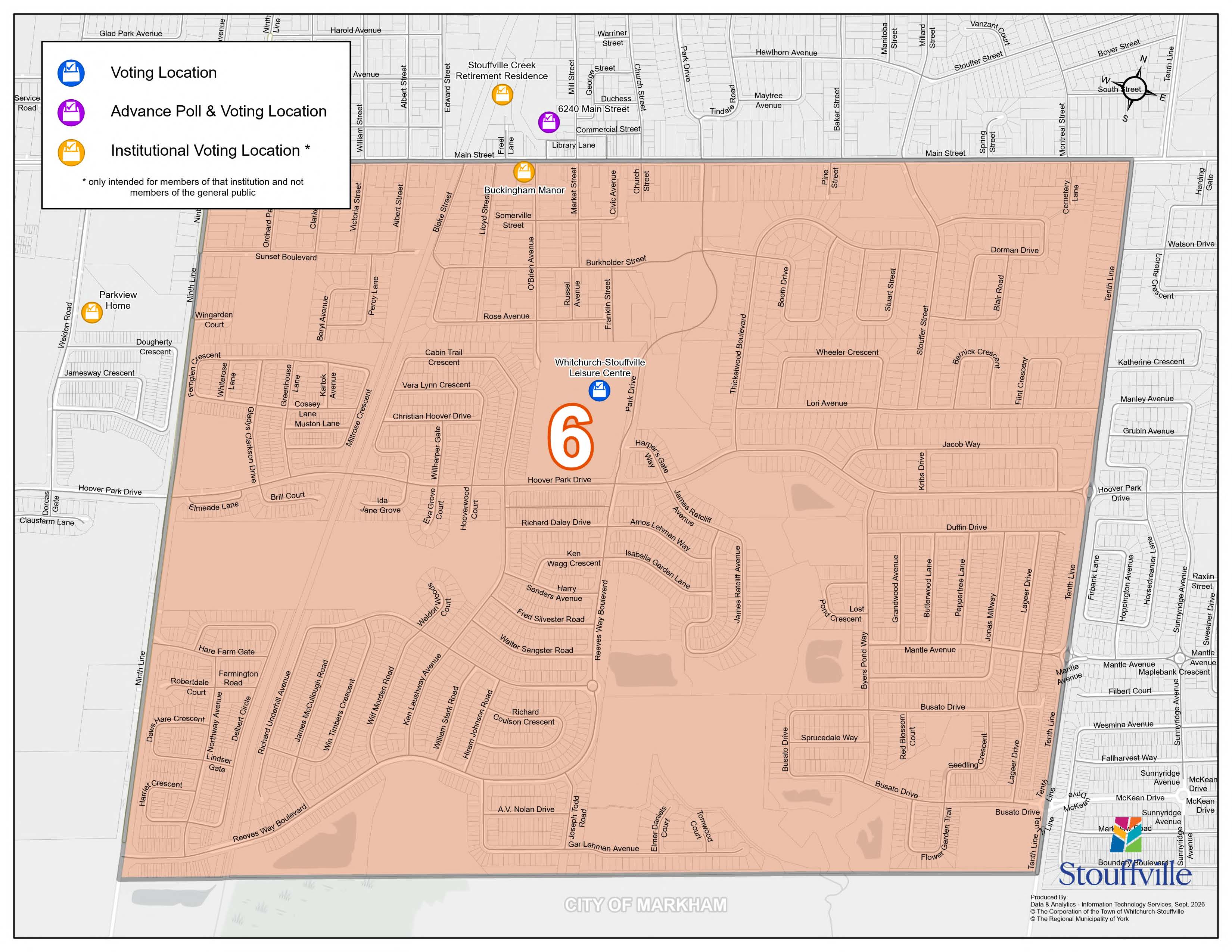
Ward 6 covers the Stouffville village core and surrounding neighbourhoods. The ward is bounded as follows:
North
- Main Street
South
- One farm lot north of 19th Avenue
East
- Tenth Line
West
- Ninth Line
Sue has been a resident and neighbour in Ward 6 since 1976, not just a councillor.
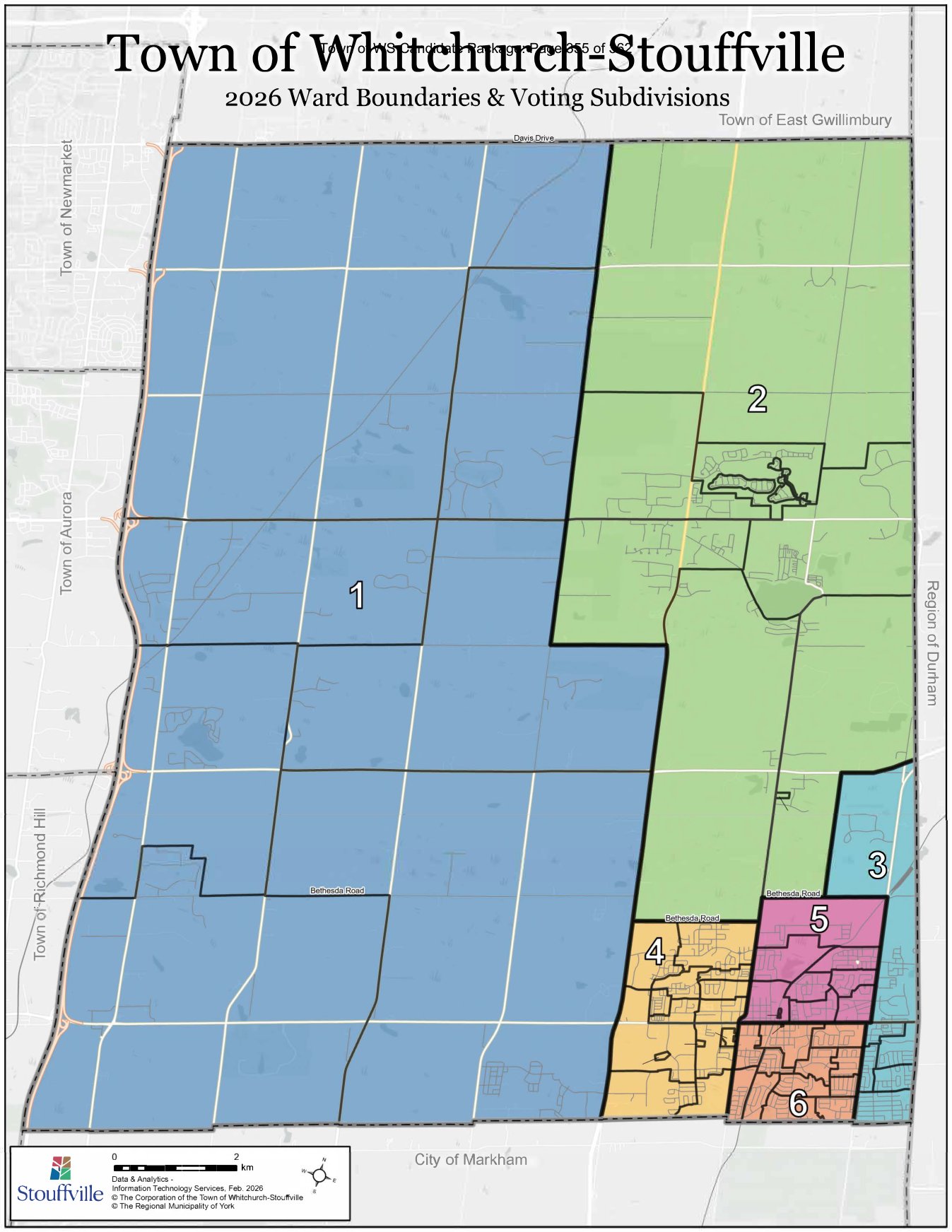
Not sure which ward you live in? The Town's official election site has an address lookup and ward map. Check your ward at stouffvillevotes.ca →
Your vote is your voice
Mark your calendar for October 26, make sure you're registered, and re-elect Sue Sherban for Ward 6.
Get Involved